
Best
Syphon Vault
Our free Windows launcher for RevivalRO Freya. Every free spin works here: your free spin of the day, @freespin, the welcome spin and invites.

Win in-game rewards for RevivalRO Freya on Spin the Wheel. Here is how it works, step by step.
How it works
Spin the Wheel is in Syphon Vault, our free Windows launcher, under Mini Games. No Windows PC? Open Syphon Chat in your browser instead.
Sign in with your Syphon account and choose Freya. Then sign in with your RevivalRO Freya game account: the user name and password you play with.
Choose the character that gets the reward and press Spin the Wheel. The wheel stops on your reward.
Your reward is sent to that character's in-game mailbox (RODEX). Log in to RevivalRO Freya and take it within 15 days.

Where to spin
Everything works in Syphon Vault. If you cannot use it, Syphon Chat in your browser works too.
Best
Our free Windows launcher for RevivalRO Freya. Every free spin works here: your free spin of the day, @freespin, the welcome spin and invites.
No Windows PC, or on your phone? Go to chat.syphon.tools and sign in with the same Syphon account. Your free spin of the day, @freespin, the welcome spin and invites work there too.

One free spin on Spin the Wheel every 24 hours, for each game account and for each PC.
Type it once in the spinthewheel room of the RevivalRO Freya community in Syphon Vault for an extra spin.
Set up your chat profile once and claim a free spin for the server you choose.
Share your code. When a new player uses it and plays, you both get a free spin. Every 3 friends = 1 extra spin.
Every reward goes to the in-game mailbox of the character you choose.
Step by step
It takes a few minutes the first time. The pictures show Syphon Chat; it looks the same in Syphon Vault.
Syphon Vault is the free Windows launcher for RevivalRO Freya and our other games. Download it from our website and install it.
Open Syphon Vault and sign in with your Syphon account. No account yet? Make one for free right in Syphon Vault, then confirm your email.
Open Chat in Syphon Vault, pick the RevivalRO Freya community on the left, and open the room spinthewheel in the Community group.

Type @freespin in the message box and press Enter. It is not posted in the room: the answer is a card that only you can see.

If Spin the Wheel does not know your RevivalRO Freya game account yet, it asks for it: the user name and password you log in to the game with. Your password is checked by the Freya game server and never saved.

The card says You got a free spin on Freya! Press Spin now and Spin the Wheel opens on Freya. Choose the character that gets the reward, then press Spin the Wheel.

Your reward goes to that character's mailbox. Log in to RevivalRO Freya, open your mailbox (RODEX) and take it within 15 days.

Welcome spin
Set up your Syphon Chat profile once and claim one free spin for the server you choose. Your chat profile is the same in Syphon Vault and in your browser: use whichever you like.
Syphon VaultChatChat profile
Open Chat in Syphon Vault. The welcome spin's card waits at the top of Friends. Press Set up my profile and your profile opens.
Browserchat.syphon.toolsChat profile
Go to chat.syphon.tools and sign in with your Syphon account. The same card waits at the top of Friends. Press Set up my profile and Chat settings open on Your profile.
Three things, each saved once. The card ticks each one as soon as you save it.


With all three done, the card says Bonus Spin Unlocked. Press Claim My Free Spin.

Choose Freya for RevivalRO Freya. Choose carefully:
You can claim this bonus only once. Choose GemstoneRO, Loki, or Freya. Only your selected server receives the free spin.
A server that says Coming soon cannot be chosen yet.

Press Claim my free spin on Freya. If Spin the Wheel does not know your RevivalRO Freya game account yet, it asks for it: the user name and password you log in to the game with. Your password is checked by the Freya game server and never saved.


The card says Your free spin on Freya is ready! Press Spin now and Spin the Wheel opens on Freya. Choose the character that gets the reward, then press Spin the Wheel.

Your reward goes to that character's mailbox. Log in to RevivalRO Freya, open your mailbox (RODEX) and take it within 15 days.
Invite friends
When a new player uses your code and plays, you both get a free spin.
In Spin the Wheel, choose Freya and sign in with your game account. Press Invite friends under Your game account: your code is there, with Copy.

Press Copy for a short message with your code and a link to this page, or share it straight to WhatsApp, Discord, Facebook, X, Telegram, Reddit, LINE or email with the buttons under your code.
Your friend opens Spin the Wheel, chooses Freya, signs in and types the code under Got a code from a friend?, then presses Use code. Typing @freespin with the code in the spinthewheel room works too, for example @freespin K7Q2-M9PX.
When your friend reaches the level and the play time that Your invites shows (open it with the Porings beside Invite friends), your friend counts and you both get a free spin. Spin the Wheel tells you both, and Your invites shows how far each friend is.
Each friend who counts on RevivalRO Freya wakes up one Poring on your milestone bar, in Invite friends and in Your invites. At 3, you get 1 extra free spin on RevivalRO Freya, and the bar starts again: 6 friends give 2 extra spins, 9 give 3, and so on, with no end.
It comes on top of the free spin each friend gives you, and it is a bonus spin like the others: your free spin of the day is used first, then your bonus spins, up to 3 a day.

Do not try to cheat. Spin the Wheel is protected by strong detection that works without you noticing, and we see everything. Players who cheat are banned.
Spin the Wheel only works on your own PC and your normal internet connection. Turn off any VPN or proxy, and use Syphon Vault on your own computer, not in a virtual machine. Still closed? Ask our staff on Discord.
In the in-game mailbox (RODEX) of the character you chose when you spun. Log in with that character and take it within 15 days: after that the mail is gone.
Yes: open chat.syphon.tools in your phone's browser and sign in with your Syphon account. Your free spin of the day, @freespin, the welcome spin and invites all work there.
Not yet: Loki says Coming soon on Spin the Wheel. You can spin for GemstoneRO and Freya.
Your password is checked by the game server when you sign in, and it is never saved by Syphon Vault or Syphon Chat.
Spin the Wheel
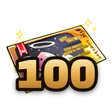
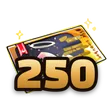
Each spin on Freya wins one of these rewards. It goes to the in-game mailbox of the character you choose.



On the Spin the Wheel page, the Poring with the FREE SPINS sign brings you back to this guide.
Download Syphon Vault Open Syphon Chat Questions? Ask on Discord